Quick Start
SSH
1. Launch programs on multiple hosts without communication
from absl import app
import logging
from tlaunch import lp_ssh

class Worker:
  def __init__(self, worker_id):
    self.worker_id = worker_id

  def run(self):
    logging.info('Worker {}:{}'.format(self.worker_id, i))
    lp_ssh.stop()

def make_program():
  program = lp_ssh.Program('worker')
  worker_num = 2
  current_num = 0
  for host in ['host1','host2']:
    for i in range(worker_num):
      ssh_node  = lp_ssh.SSHNode(Worker, current_num).to_host(host)
      current_num += 1
      program.add_node(ssh_node, label=host+'_worker')
  lp_ssh.launch(program, terminal='ssh_tmux_session')
def main(_):
  make_program()

if __name__ == '__main__':
  app.run(main)
In this code, we place Worker on host1 and host2 via to_host() function. With lp_ssh.launch(),
Each Worker will start to run on its corresponding hosts. Besides, examples/mnist/run.sh
shows an example of how to train MNIST dataset on multiple hosts.
2. Launch programs on multiple hosts with communication
examples/commands/run_cmd.py gives an example of how to check GPU status
of remote hosts. The information can be transferred via defining a TransmitNode.
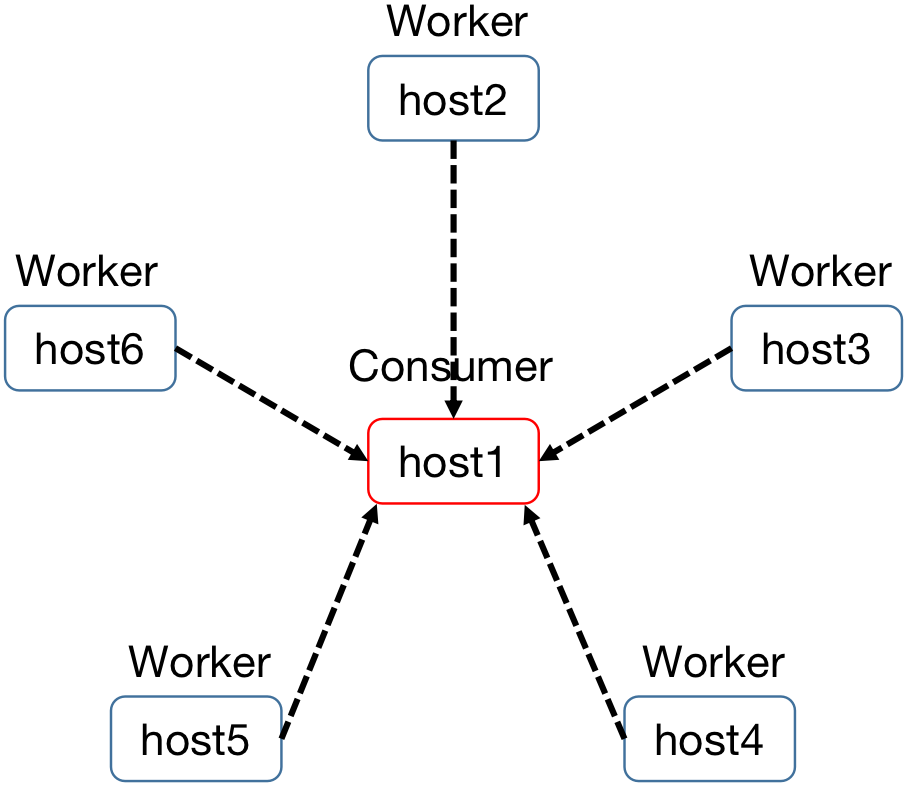
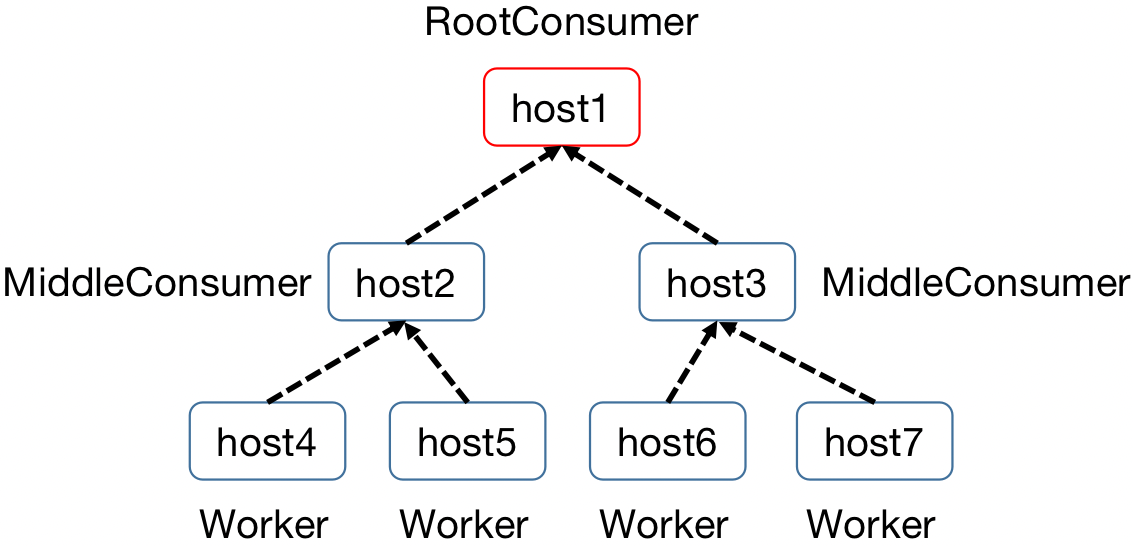
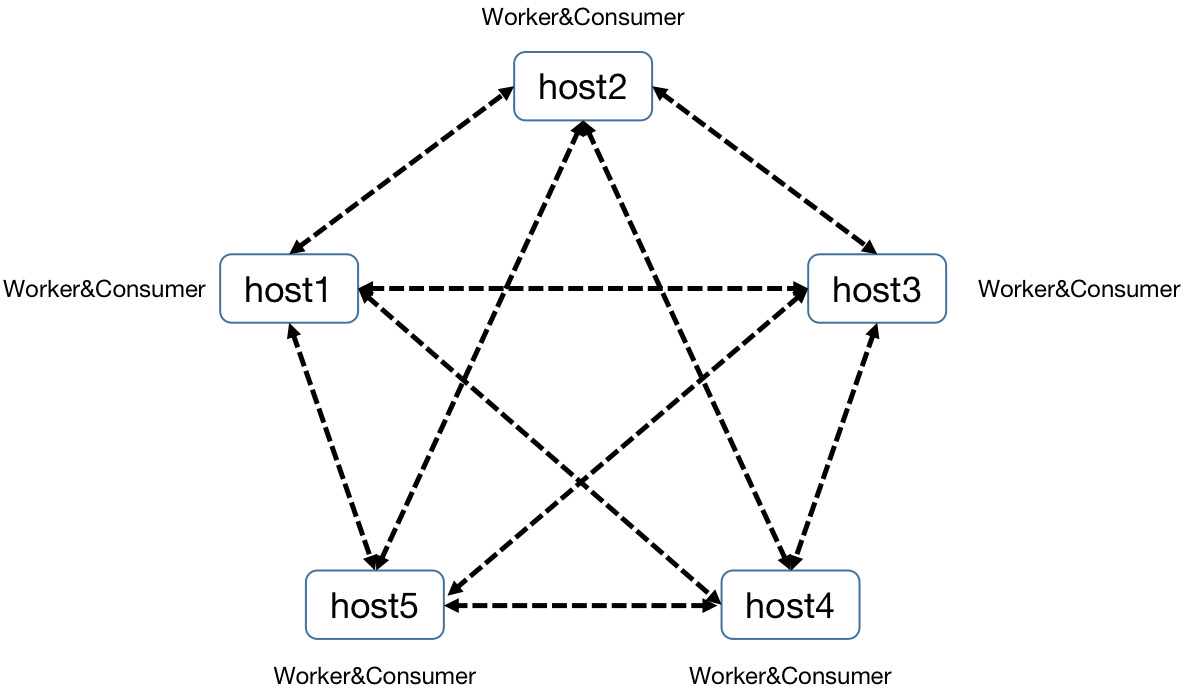
3. Different data-transfer types
- Star type (see more in examples/trans_types/star_type.py):
- Tree type (see more in examples/trans_types/tree_type.py):
- Net type (see more in examples/trans_types/net_type.py):
Kubernetes
After running the operator in the kubernetes cluster, you should be able to use
lp_k8s to deploy some launchpad program. Below is a very simple
1.Basic Example
test_worker_comsumer.py gives an example of worker and consumer , modified from the consumer_producer example on Deepmind launchpad's
github main page.
import sys
from absl import app
import logging
import time

import launchpad as lp
from tlaunch import lp_k8s
from tlaunch.lp_k8s.util import get_namespace


class Worker:
    def work(self, context):
        log = logging.getLogger()
        log.setLevel(logging.DEBUG)
        log.info('I got called, wohoo...')
        time.sleep(5)
        log.info('I am waking up')
        return context


class Consumer:
    def __init__(self, producers):
        self._producers = producers

    def run(self):
        log = logging.getLogger()
        log.setLevel(logging.DEBUG)
        log.info('calling workers')
        futures = [producer.futures.work(context)
                   for context, producer in enumerate(self._producers)]
        results = [future.result() for future in futures]
        log.info('Results: %s', results)
        # lp_k8s.stop()


def make_program(num_producers):
    program = lp.Program('consumer_producers')
    with program.group('producer'):
        producers = [
            program.add_node(lp_k8s.CourierNode(Worker)) for _ in range(num_producers)
        ]
    node = lp_k8s.CourierNode(
        Consumer,
        producers=producers)
    program.add_node(node, label='consumer')
    return program


def main(_):
    ns = get_namespace()
    program = make_program(num_producers=1)
    lp_k8s.launch(program, namespace=ns)


if __name__ == '__main__':
    app.run(main)
As you can see here, you only need very little modification to your existing code to launch the program on kubernetes cluster.
lp_k8s only provides two functions, that is, launch and
stop.
launch will create a LpJob custom resource on kubernetes, and the
operator will handle the rest, such as creating the pod to run the node
functions and creating the service for communication between pods.
stop will send a stop signal to the operator, then the operator would clean
up the LpJob.
Basically if you know how to write launchpad program, this is almost exactly the same.
2.Use GPU
We can customize the configuration information by adding a config object for node. For example, when we want to apply gpu resources for node, we can refer to the following example.
import sys
import logging
import subprocess
import xmltodict
from xml.parsers import expat
import launchpad as lp
from tlaunch import lp_k8s
from tlaunch.lp_k8s import Config, Container, Resource
from tlaunch.lp_k8s.util import get_namespace

def install(name):
    subprocess.call(['pip', 'install', name])

def get_gpu_status(gpu):
    gpu_id = gpu['minor_number']
    product_name = gpu['product_name']
    memory_total = int(gpu['fb_memory_usage']['total'].split(' ')[0])
    memory_used = int(gpu['fb_memory_usage']['used'].split(' ')[0])
    memory_free = int(gpu['fb_memory_usage']['free'].split(' ')[0])

    return 'GPU:{}\t{}Mb/{}Mb\t{}'.format(gpu_id, memory_used, memory_total, product_name)

def get_gpus():
    log = logging.getLogger()
    log.setLevel(logging.DEBUG)

    cmd = 'nvidia-smi -x -q'
    output = subprocess.getoutput(cmd)

    json = xmltodict.parse(output, expat=expat)
    gpus = json['nvidia_smi_log']['gpu']

    gpu_status = []
    if type(gpus) is list:
        for gpu in gpus:
            gpu_status.append(get_gpu_status(gpu))
    elif type(gpus) is dict:
        gpu_status.append(get_gpu_status(gpus))

    return {'localhost': gpu_status}


class GPUTest:
    def __init__(self):
        pass

    def run(self):
        gpu_status = get_gpus()
        for host in gpu_status:
            logging.getLogger().warning('Host {}:'.format(host))
            for g_s in gpu_status[host]:
                logging.getLogger().warning(g_s)

        # lp_k8s.stop()


def make_program():
    program = lp.Program('test_gpu')
    node = lp_k8s.CourierNode(
        GPUTest)
    program.add_node(node, label='tester')
    return program


def main(argv):
    ns = get_namespace()
    program = make_program()
    command = ['bash', '-c' , 'export LIBCUDA_LOG_LEVEL=0; pip install xmltodict; python3 -u -mtlaunch.lp_k8s.process_entry']
    config = Config(namespace=ns,
                    container=Container(namespace=ns,
                                        command=command,
                                        flags=argv,
                                        resources=Resource(nvidia_gpu=2,
                                                           nvidia_gpu_memory=4000,
                                                           nvidia_gpu_cores=100)))

    lp_k8s.launch(program,
                  namespace=ns,
                  group_config={'tester': config})


if __name__ == '__main__':
    from absl import flags

    FLAGS = flags.FLAGS
    FLAGS([""])
    main(sys.argv[1:])